Test your PostgreSQL database like a sorcerer
Mark (aka Winsaucerer) here to show you how you can test your PostgreSQL database like a sorcerer. We are going to be using Spawn, a SQL build system supporting migrations and testing. You do not need to be using Spawn for migrations in order to use it for testing. Spawn does not require any extension installed. All you need is the spawn CLI and a psql connection to the database for Spawn to connect through.
Spawn was built to solve some migration pains I’ve experienced, but I happily discovered that when used for testing, it is very powerful. To show you some of that power, we’re going to use a contrived database example. It uses golden file testing to determine success. When the test runs, we capture the stdout and stderr output from psql, and compare that to expected output.
Testing with Spawn involves these steps:
- Create a new test with
spawn test new <name>and fill out the test steps - Check test outputs with
spawn test run <name>(or view the SQL that will be sent to psql viaspawn test build <name>) - When outputs are as expected, create the golden file with
spawn test expect <name> - Run the test and compare to expected output with
spawn test compare <name>
For now, Spawn only supports connecting via psql, which means that you have access to all the features that psql provides.
To get started, follow the Spawn install instructions:
Install SpawnAnd then create a new folder on your system, and initialise a new project with a docker compose config ready for us to play with:
# inside your new folder:spawn init --dockerdocker compose up -dYou now have a running docker based PostgreSQL database and a spawn.toml file configured to connect to it. We are not assuming that you are using Spawn or any other tool for migrations, so you can manually create and update the database by connecting directly using psql:
docker exec -ti postgres-db psql -U postgresCreate the database
Section titled “Create the database”Create the initial tables in PostgreSQL like so:
CREATE DATABASE regression;\c regressionCREATE TABLE item ( item_id SERIAL PRIMARY KEY, name TEXT NOT NULL, price DECIMAL(10, 2) NOT NULL DEFAULT 0.00 CHECK (price >= 0.00), quantity_on_hand INTEGER NOT NULL DEFAULT 0 CHECK (quantity_on_hand >= 0), created_at TIMESTAMPTZ DEFAULT NOW(), updated_at TIMESTAMPTZ DEFAULT NOW());
CREATE TABLE "order" ( order_id SERIAL PRIMARY KEY, status TEXT DEFAULT 'PENDING', created_at TIMESTAMPTZ DEFAULT NOW(), updated_at TIMESTAMPTZ DEFAULT NOW());
CREATE TABLE order_item ( order_item_id SERIAL PRIMARY KEY, order_id_order INTEGER NOT NULL REFERENCES "order"(order_id), -- foreign key name is <field>_<table> item_id_item INTEGER NOT NULL REFERENCES item(item_id), quantity INTEGER NOT NULL CHECK (quantity > 0), price_per_unit DECIMAL(10, 2) NOT NULL, created_at TIMESTAMPTZ DEFAULT NOW(), updated_at TIMESTAMPTZ DEFAULT NOW());Build our first test
Section titled “Build our first test”Let’s create our first test:
spawn test new check-order-creationThis will have created a very basic test inside tests/check-order-creation/test.sql, with content similar to the following:
-- Test fileSELECT 1;Spawn executes your test file through psql, captures the textual output, and compares it against an expected “golden” file. spawn test expect records the current output, while spawn test compare reruns the SQL and diffs any changes to the expected output. To see what output this test would produce:
spawn test run check-order-creationYou should see output similar to the following:
?column?---------- 1(1 row)Imagine we were satisfied with this as our test. We can then tell Spawn that the output it currently generates is the expected output, and then we can run the actual test comparison:
# Creates a file `tests/check-order-creation/expected`spawn test expect check-order-creation# Compares the output from running the test with the expected output:spawn test compare check-order-creationNow, change the test from SELECT 1 to SELECT 2 and run compare again:
spawn test compare check-order-creationThe test will fail, because the expected file differs from the actual output. We see a report like this (which may be nicely coloured in your terminal):
[FAIL] check-order-creation--- Diff ---1   1    |  ?column?2   2    | ----------3        |-        1    3    |+        24   4    | (1 row)5   5    |
-------------
Error: ! Differences found in one or more tests
From the diff, we can see we expected a result of 1, but got 2.
Let’s make a real test. First order of business, we want to create a copy of the database so that we can rerun the test multiple times without making permanent changes to our database. We could wrap the test in a transaction and roll it back (Spawn works fine this way), but some operations can’t run inside a transaction block (like creating databases), and sometimes you want to test behavior across commits. Using WITH TEMPLATE gives you a clean slate every time without relying on rollback.
Using the following pattern, we use the regression database created as the base for tests, and create a copy of it using WITH TEMPLATE within which we can freely make changes. As soon as the test is done, it cleans up the temporary test database and our changes are gone.
-- Protects from previous failed testDROP DATABASE IF EXISTS check_order_creation_test;-- Create new database using our base database as the templateCREATE DATABASE check_order_creation_test WITH TEMPLATE regression;-- Connect to the new test database using the psql \c command\c check_order_creation_test;
-- Insert an item and list what we haveINSERT INTO item (name, quantity_on_hand, price) VALUES ('Apple', 1, 23.12);
SELECT item_id, name, price FROM item ORDER BY item_id;
-- Connect back to postgres, so we can delete the test db\c postgres;-- Clean up!DROP DATABASE IF EXISTS check_order_creation_test;
Every run of the test is done within its own copy of the base database. If we run the test multiple times (spawn test run check-order-creation), the count doesn’t change, despite adding a row each time, because each time the test runs it starts from the same base state.
But it’s just a little tedious to create items by hand, so let’s create a macro to simplify adding items to the database. Spawn uses minijinja for templates, with more details and examples available in the Spawn template docs. Create a file in spawn/components/testing/create-item.sql like so:
{% macro create_item(  name,  item_id="default" | safe,  quantity_on_hand=1,  price=1.23,) %}
INSERT INTO item (item_id, name, quantity_on_hand, price)VALUES    ({{item_id}}, {{name}}, {{quantity_on_hand}}, {{price}});
{%- endmacro %}
This macro creates the insert, with default values for everything except name. Note that for the primary key we have item_id="default" | safe. If we provide an item id it uses that, but if we don’t provide one then the default value is used. We must pass "default" through safe because Spawn defaults to escaping any input values as literals, but we want default to appear without quote marks. i.e., to appear as default and not "default". Using the safe filter tells Spawn to display this as it is.
Now in our original script, we can replace the insert with a single call to the macro:
{% from "testing/create-item.sql" import create_item %}...{{ create_item('Apple', price=23.12) }}{{ create_item('Banana', price=44.00, quantity_on_hand=5) }}{{ create_item('Orange', price=12.99, quantity_on_hand=3) }}{{ create_item("Dragon's Eye", price=2.99, quantity_on_hand=3) }}...SELECT item_id, name, price FROM item ORDER BY item_id;The macros produce the INSERT SQL for us, which you can see by running spawn test build check-order-creation:
DROP DATABASE IF EXISTS check_order_creation_test;CREATE DATABASE check_order_creation_test WITH TEMPLATE regression;\c check_order_creation_test;


INSERT INTO item (item_id, name, quantity_on_hand, price)VALUES    (default, 'Apple', 1, 23.12);

INSERT INTO item (item_id, name, quantity_on_hand, price)VALUES    (default, 'Banana', 5, 44.0);

INSERT INTO item (item_id, name, quantity_on_hand, price)VALUES    (default, 'Orange', 3, 12.99);

INSERT INTO item (item_id, name, quantity_on_hand, price)VALUES    (default, 'Dragon''s Eye', 3, 2.99);
SELECT item_id, name, price FROM item ORDER BY item_id;
\c postgres;DROP DATABASE IF EXISTS check_order_creation_test;
And spawn test run check-order-creation:
item_id | name | price---------+--------------+------- 1 | Apple | 23.12 2 | Banana | 44.00 3 | Orange | 12.99 4 | Dragon's Eye | 2.99(4 rows)Now, we might find ourselves wanting to use this same dataset across multiple tests, so let’s do two things:
- Create this list based on a json input
- Create a macro that fills out this table for us in one go
In a real project, you might already have test data in the database you used as the base for WITH TEMPLATE, but we’ll use this as an example to show how you could have some data that’s used by some tests but not all.
Create a json file in spawn/components/testing/fixtures/items.json:
[ { "item_id": 1, "name": "Apple", "quantity_on_hand": 1, "price": 23.12 }, { "item_id": 2, "name": "Banana", "quantity_on_hand": 5, "price": 44.0 }, { "item_id": 3, "name": "Orange", "quantity_on_hand": 3, "price": 12.99 }, { "item_id": 4, "name": "Dragon's Eye", "quantity_on_hand": 3, "price": 2.99 }]Let’s also create a new macro which is going to read this json, and loop over the items to create all our rows! Let’s put it in spawn/components/testing/fixtures/items.sql (we don’t have to use the .sql extension here, but for consistency I have):
{% from "testing/create-item.sql" import create_item %}
{% macro create_items() %}{% set items = "testing/fixtures/items.json" | read_json %}{% for item in items %}  {{ create_item(item.name, item_id=item.item_id, quantity_on_hand=item.quantity_on_hand, price=item.price) }}{% endfor %}{% endmacro %}
This macro loads the array from items.json, loops over each, and calls our earlier create_item macro to create the insert statement for each!
Update our test file test.sql to use the new macro, like so:
{% from "testing/fixtures/items.sql" import create_items %}
DROP DATABASE IF EXISTS check_order_creation_test;CREATE DATABASE check_order_creation_test WITH TEMPLATE regression;\c check_order_creation_test;
{{ create_items() }}
SELECT item_id, name, price FROM item ORDER BY item_id;
\c postgres;DROP DATABASE IF EXISTS check_order_creation_test;
And let’s build and then run. First, build shows us that the apostrophe in Dragon's Eye is properly escaped:
DROP DATABASE IF EXISTS check_order_creation_test;CREATE DATABASE check_order_creation_test WITH TEMPLATE regression;\c check_order_creation_test;


INSERT INTO item (item_id, name, quantity_on_hand, price)VALUES    (1, 'Apple', 1, 23.12);


INSERT INTO item (item_id, name, quantity_on_hand, price)VALUES    (2, 'Banana', 5, 44.0);


INSERT INTO item (item_id, name, quantity_on_hand, price)VALUES    (3, 'Orange', 3, 12.99);


INSERT INTO item (item_id, name, quantity_on_hand, price)VALUES    (4, 'Dragon''s Eye', 3, 2.99);


SELECT item_id, name, price FROM item ORDER BY item_id;
\c postgres;DROP DATABASE IF EXISTS check_order_creation_test;
And the output for the test shows the four items:
item_id | name | price---------+--------------+------- 1 | Apple | 23.12 2 | Banana | 44.00 3 | Orange | 12.99 4 | Dragon's Eye | 2.99(4 rows)Now we have an easy to include test fixture of items!
Creating an order
Section titled “Creating an order”To demonstrate how we can do some tests with functions and triggers, let’s create a function for creating an order, and a trigger that updates quantity on hand when orders are created, updated, or deleted. First, let’s create a function for creating an order, and apply it to our regression base database:
-- Composite type for order item inputCREATE TYPE order_item_input AS (    quantity INTEGER,    item_id INTEGER);
-- Function to create an order with itemsCREATE OR REPLACE FUNCTION create_order(    p_status TEXT,    p_items order_item_input[]) RETURNS INTEGER AS $$DECLARE    v_order_id INTEGER;BEGIN    -- Create the order    INSERT INTO "order" (status)    VALUES (p_status)    RETURNING order_id INTO v_order_id;
    -- Create order items with prices from item table    INSERT INTO order_item (order_id_order, item_id_item, quantity, price_per_unit)    SELECT v_order_id, items.item_id, items.quantity, i.price    FROM UNNEST(p_items) AS items    LEFT JOIN item i ON i.item_id = items.item_id; -- missing items produce NULL price and fail NOT NULL on price_per_unit    RETURN v_order_id;END;$$ LANGUAGE plpgsql;
Now we’ll create a trigger function and trigger to automatically update inventory when order items change. This is not a way that I would recommend building an order platform, but it’s useful from the perspective of showing how easy it is to test triggers and functions with Spawn. This trigger updates the quantity_on_hand column in the item table when an order item is updated. And since the item table has a CHECK constraint that prohibits values lower than 0, we will get an error when a change would result in dropping our stock below 0. Create this in the regression base database:
-- Trigger function to update item quantity on handCREATE OR REPLACE FUNCTION update_item_quantity_on_order_item_change()RETURNS TRIGGER AS $$BEGIN    UPDATE item    SET quantity_on_hand = quantity_on_hand + COALESCE(OLD.quantity, 0) - COALESCE(NEW.quantity, 0)    WHERE item_id = COALESCE(NEW.item_id_item, OLD.item_id_item);
    RETURN COALESCE(NEW, OLD);END;$$ LANGUAGE plpgsql;
-- Create the trigger on our order_item tableCREATE TRIGGER order_item_quantity_trigger    AFTER INSERT OR UPDATE OR DELETE ON order_item    FOR EACH ROW    EXECUTE FUNCTION update_item_quantity_on_order_item_change();
And now we can update our test to create orders. Let’s try to create two orders, the first of which we expect to succeed, and the second to fail. I’ve also included some notes to help with understanding the tests in the future, as well as selecting items from the item table as we go, to see how stock levels change over time:
{% from "testing/fixtures/items.sql" import create_items %}DROP DATABASE IF EXISTS check_order_creation_test;CREATE DATABASE check_order_creation_test WITH TEMPLATE regression;\c check_order_creation_test;-- By default, spawn stops on errors, but we want errors to be part of our test:\set ON_ERROR_STOP off-- The default order includes timestamps.  By using a terse verbosity, we get a stable error across runs:\set VERBOSITY terse
{{ create_items() }}
SELECT item_id, name, quantity_on_hand, price FROM item ORDER BY item_id;
BEGIN;SELECT 'Create order for 1 apple and two bananas, reducing quantity on hand:' as note;-- gset stores the returned value under :'first_order_id'SELECT create_order('PENDING', ARRAY[    ROW(1, 1)::order_item_input,  -- 1 Apple (item_id 1)    ROW(2, 2)::order_item_input   -- 2 Bananas (item_id 2)]) as first_order_id \gset
SELECT item_id, name, quantity_on_hand, price FROM item WHERE item_id IN (1, 2) ORDER BY item_id;
SELECT 'Increased banana order by one, expect one less on hand:' as note;
UPDATE order_item SET quantity = quantity + 1 WHERE item_id_item = 2 AND order_id_order = :'first_order_id';
SELECT item_id, name, quantity_on_hand, price FROM item WHERE item_id IN (1, 2) ORDER BY item_id;
SELECT 'Delete bananas from order, expecting all to be back on hand:' as note;
DELETE FROM order_item WHERE item_id_item = 2 AND order_id_order = :'first_order_id';
SELECT item_id, name, quantity_on_hand, price FROM item WHERE item_id IN (1, 2) ORDER BY item_id;
SELECT 'New order for 1 apple and 2 bananas which should fail due to apple shortage:' as note;SELECT create_order('PENDING', ARRAY[    ROW(1, 1)::order_item_input,  -- Apple (item_id 1)    ROW(2, 2)::order_item_input   -- 2 Bananas (item_id 2)]);ROLLBACK;
\c postgres;DROP DATABASE IF EXISTS check_order_creation_test;
We expect the first order to succeed, and the second to fail, and that’s exactly what we see (spawn test run check-order-creation):
NOTICE:  database "check_order_creation_test" does not exist, skipping item_id |     name     | quantity_on_hand | price---------+--------------+------------------+-------       1 | Apple        |                1 | 23.12       2 | Banana       |                5 | 44.00       3 | Orange       |                3 | 12.99       4 | Dragon's Eye |                3 |  2.99(4 rows)
                                 note---------------------------------------------------------------------- Create order for 1 apple and two bananas, reducing quantity on hand:(1 row)
 item_id |  name  | quantity_on_hand | price---------+--------+------------------+-------       1 | Apple  |                0 | 23.12       2 | Banana |                3 | 44.00(2 rows)
                          note--------------------------------------------------------- Increased banana order by one, expect one less on hand:(1 row)
 item_id |  name  | quantity_on_hand | price---------+--------+------------------+-------       1 | Apple  |                0 | 23.12       2 | Banana |                2 | 44.00(2 rows)
                             note-------------------------------------------------------------- Delete bananas from order, expecting all to be back on hand:(1 row)
 item_id |  name  | quantity_on_hand | price---------+--------+------------------+-------       1 | Apple  |                0 | 23.12       2 | Banana |                5 | 44.00(2 rows)
                                     note------------------------------------------------------------------------------ New order for 1 apple and 2 bananas which should fail due to apple shortage:(1 row)
ERROR:  new row for relation "item" violates check constraint "item_quantity_on_hand_check"
That’s finished! Our test validates that basic use of the order works as expected, and that the trigger updates the underlying table in the expected way. We’ve included some notes to make things easier for future testers to understand what is going on. Let’s set the current output as the expected output for our test, and run it:
spawn test expect check-order-creationspawn test compare check-order-creation[PASS] check-order-creationAnd one final validation: connect to the database, and drop the trigger from the table and rerun compare, just to see the output:
DROP TRIGGER order_item_quantity_trigger ON order_item;spawn test compare check-order-creation[FAIL] check-order-creation--- Diff ---14 14 |15 15 | item_id | name | quantity_on_hand | price16 16 | ---------+--------+------------------+-------17 |- 1 | Apple | 0 | 23.1218 |- 2 | Banana | 3 | 44.00 17 |+ 1 | Apple | 1 | 23.12 18 |+ 2 | Banana | 5 | 44.0019 19 | (2 rows)20 20 |21 21 | note--------------------------------------------------------------------------------25 25 |26 26 | item_id | name | quantity_on_hand | price27 27 | ---------+--------+------------------+-------28 |- 1 | Apple | 0 | 23.1229 |- 2 | Banana | 2 | 44.00 28 |+ 1 | Apple | 1 | 23.12 29 |+ 2 | Banana | 5 | 44.0030 30 | (2 rows)31 31 |32 32 | note--------------------------------------------------------------------------------36 36 |37 37 | item_id | name | quantity_on_hand | price38 38 | ---------+--------+------------------+-------39 |- 1 | Apple | 0 | 23.12 39 |+ 1 | Apple | 1 | 23.1240 40 | 2 | Banana | 5 | 44.0041 41 | (2 rows)42 42 |--------------------------------------------------------------------------------45 45 | New order for 1 apple and 2 bananas which should fail due to apple shortage:46 46 | (1 row)47 47 |48 |-ERROR: new row for relation "item" violates check constraint "item_quantity_on_hand_check" 48 |+ create_order 49 |+-------------- 50 |+ 4 51 |+(1 row) 52 |+
-------------
Error: ! Differences found in one or more testsHere it is in glorious colour:
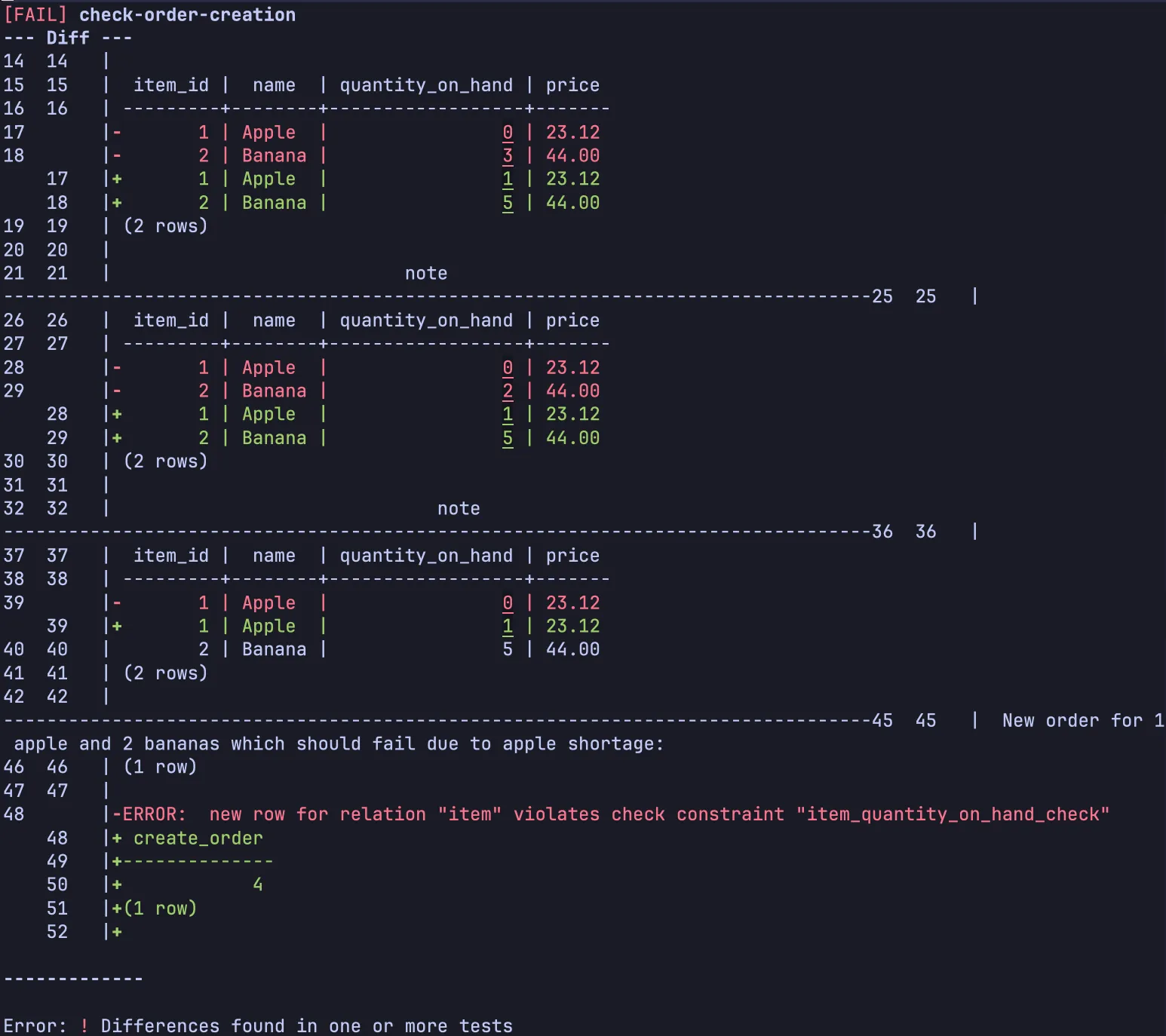
Perfect! If the trigger is ever removed, our regression test will pick that up! It validates that the database behaves in the way we require.
As your tests grow, you may want to explore using json sources to loop over multiple test cases to create data driven tests. The ability to include external structured data (including binary data via read_file and base64_encode) opens up new possibilities for streamlining tests, and I’m sure there are many clever things that will be achievable that creative users will think of. Spawn is far from complete and as it is used more, new features will be added to support robust testing of your database.
Hopefully this shows you a little idea of the possibilities for testing your PostgreSQL database using Spawn. There’s a short introduction covering both Spawn’s migration and testing capabilities in The Magic of Spawn, if you’d like to learn more about its migration features.
Spawn is also able to be used as a GitHub action, which is documented at CI/CD.